

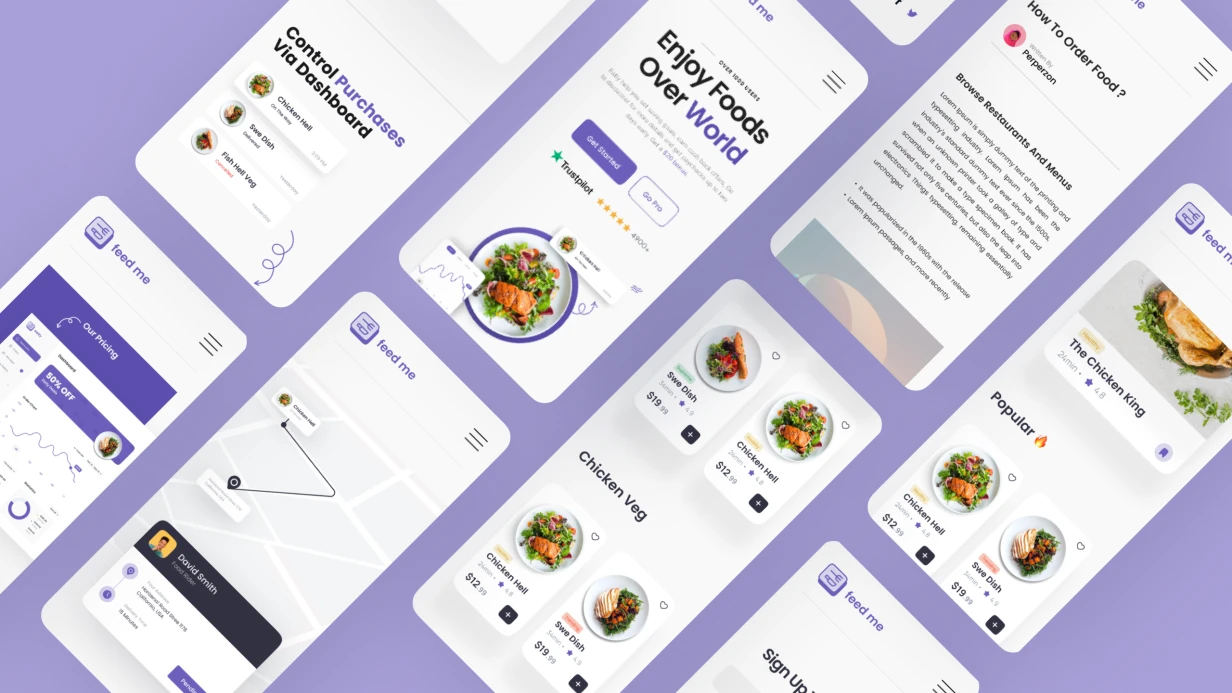
"מה לבשל ממה שיש במקרר" — בעיה קלאסית עם מלאי מוגבל. עוזר בינה מלאכותית אינו רק מנוע חיפוש מתכונים; הוא מחולל מתכונים עבור סט ספציפי של מרכיבים, הגבלות תזונתיות וזמן בישול. אנו מטפלים ביישום מקצה לקצה של עוזר כזה: מעיצוב ועד פרסום בחנות האפליקציות.
בפועל: משתמש פותח את האפליקציה, מצלם את מדף המקרר שלו, ומקבל שלוש אפשרויות ארוחה תוך התחשבות בזמן ובתזונה. זמן מצילום למתכון: פחות מ-5 שניות. יישמנו פתרונות כאלה עבור עשרות לקוחות, והפחתנו את זמן חיפוש המתכונים ב-40% בממוצע.
בעיות שעוזר הבינה המלאכותית פותר
לא יודעים מה לבשל משאריות?
המרכיבים נגמרים, והרעיונות דלים. עוזר הבינה המלאכותית סורק את תכולת המקרר (טקסט, קול או תמונה) ומייצר מתכון תוך שימוש רק במרכיבים הזמינים. מצרכים בסיסיים (מלח, שמן, מים) מתווספים אוטומטית.
אלרגיות ודיאטות: איך להימנע מטעויות?
בחירת מנה שגויה עלולה לעלות בבריאות. אנו מיישמים מערכת סינון גמישה: משתמשים מציינים אלרגיות (אגוזים, גלוטן, לקטוז) ודיאטה (טבעונית, קטוגנית, פליאו), והפרומפט מבטיח הרחקת מרכיבים אסורים. המודל מחזיר JSON עם רשימת מרכיבים מלאה לאימות.
זמן בישול: איך לעמוד בדדליין של 30 דקות?
אנשי מקצוע עסוקים מעריכים מתכונים מהירים. העוזר מכבד זמן בישול מקסימלי ובוחר מנות שניתן בפועל להכין במסגרת הזמן. כל שלב מתוזמן, וטיימר מובנה בכרטיס המתכון.
איך אנחנו עושים את זה: סטאק וגישה
זיהוי מרכיבים
שלושה ערוצי קלט, כולם נחוצים. טקסט הוא ברור. קול דרך SFSpeechRecognizer ב-iOS או SpeechRecognizer באנדרואיד. השימושי ביותר: תמונה של תכולת המקרר עם זיהוי מרכיבים.
לזיהוי, אנו משתמשים במודלים על-המכשיר: CoreML ב-iOS ו-ML Kit באנדרואיד. זה מהיר ופרטי יותר מפתרונות ענן. לדוגמה, CoreML עם מודל מכוונן על Food-101 מעבד תמונה ב-200-300 אלפיות השנייה, מהיר פי 3 מ-Cloud Vision API (לא כולל השהיית רשת).
// iOS - распознавание ингредиентов через Vision + CoreML
func recognizeIngredients(in image: UIImage) async throws -> [String] {
    guard let cgImage = image.cgImage else { return [] }
    let model = try FoodClassifier(configuration: .init())
    let vnModel = try VNCoreMLModel(for: model.model)
    let request = VNCoreMLRequest(model: vnModel)
    request.imageCropAndScaleOption = .centerCrop
    let handler = VNImageRequestHandler(cgImage: cgImage)
    try handler.perform([request])
    guard let results = request.results as? [VNClassificationObservation] else { return [] }
    return results
        .filter { $0.confidence > 0.6 }
        .prefix(10)
        .map { $0.identifier }
}
באנדרואיד, אנו משתמשים ב-ML Kit // iOS - распознавание ингредиентов через Vision + CoreML func recognizeIngredients(in image: UIImage) async throws -> [String] { guard let cgImage = image.cgImage else { return [] } let model = try FoodClassifier(configuration: .init()) let vnModel = try VNCoreMLModel(for: model.model) let request = VNCoreMLRequest(model: vnModel) request.imageCropAndScaleOption = .centerCrop let handler = VNImageRequestHandler(cgImage: cgImage) try handler.perform([request]) guard let results = request.results as? [VNClassificationObservation] else { return [] } return results .filter { $0.confidence > 0.6 } .prefix(10) .map { $0.identifier } } עם מודל מקומי (RemoteModel שמורד בהפעלה הראשונה). הבחירה בין על-המכשיר לענן היא פשרה בין מהירות לדיוק. אנו ממליצים על על-המכשיר לפריטים בסיסיים ועל ענן למרכיבים נדירים.
השוואת גישות:
| פרמטר | על-המכשיר (CoreML/ML Kit) | ענן (Vision API) |
|---|---|---|
| מהירות | 200-300 אלפיות השנייה | 500-1500 אלפיות השנייה + רשת |
| פרטיות | הנתונים נשארים על המכשיר | הנתונים נשלחים לשרת |
| דיוק | ~85% לפריטים בסיסיים | ~95% למרכיבים נדירים |
| עלות | חינם | תשלום לפי בקשה |
פרטים טכניים של שילוב הזיהוי
עבור iOS, אנו משתמשים ב-Vision + CoreML עם מודל FoodClassifier (מכוונן על Food-101). פרטיות מובטחת על ידי עיבוד על-המכשיר. עבור אנדרואיד, ML Kit ImageLabeling עם מודל מקומי.יצירת מתכונים עם אילוצים
הפרומפט הוא המפתח. אנו בונים אותו דינמית, ומוסיפים הגבלות מפרופיל המשתמש. ImageLabeler הוא חובה — ניתוח JSON עטוף ב-markdown בייצור אינו בר-קיימא.
struct RecipeRequest: Encodable {
    let ingredients: [String]
    let servings: Int
    let maxCookingMinutes: Int
    let dietaryRestrictions: [String] // "vegan", "gluten-free", "nut-allergy", ...
    let difficulty: String // "easy", "medium", "hard"
    let cuisinePreferences: [String] // опционально
}

func buildRecipePrompt(_ req: RecipeRequest) -> String {
    """
    Create a recipe using ONLY these ingredients (you may add basic pantry staples: salt, oil, water, common spices):
    Available: \(req.ingredients.joined(separator: ", "))
    Requirements:
    - Servings: \(req.servings)
    - Max cooking time: \(req.maxCookingMinutes) minutes
    - Dietary: \(req.dietaryRestrictions.isEmpty ? "none" : req.dietaryRestrictions.joined(separator: ", "))
    - Difficulty: \(req.difficulty)
    Return JSON: {name, cookingTime, servings, ingredients: [{name, amount, unit}], steps: [{number, instruction, duration}], nutrition: {calories, protein, carbs, fat}}
    """
}
כרטיס מתכון בממשק המשתמש
// Android Compose
@Composable
fun RecipeCard(recipe: Recipe) {
    LazyColumn(
        modifier = Modifier.fillMaxSize(),
        contentPadding = PaddingValues(16.dp),
        verticalArrangement = Arrangement.spacedBy(12.dp)
    ) {
        item {
            Text(recipe.name, style = MaterialTheme.typography.headlineSmall)
            Row(horizontalArrangement = Arrangement.spacedBy(16.dp)) {
                InfoChip(Icons.Default.Timer, "${recipe.cookingTime} мин")
                InfoChip(Icons.Default.People, "${recipe.servings} порц.")
                InfoChip(Icons.Default.LocalFireDepartment, "${recipe.nutrition.calories} ккал")
            }
        }
        item {
            Text("Ингредиенты", style = MaterialTheme.typography.titleMedium)
        }
        items(recipe.ingredients) { ing ->
            Text("• ${ing.amount} ${ing.unit} ${ing.name}")
        }
        item {
            Text("Приготовление", style = MaterialTheme.typography.titleMedium)
        }
        itemsIndexed(recipe.steps) { index, step ->
            StepCard(number = index + 1, instruction = step.instruction, duration = step.duration)
        }
    }
}
טיימר לשלבי בישול
כל שלב מתוזמן מתחיל טיימר ישירות מהכרטיס. אנו משתמשים ב-response_format: json_object וב-struct RecipeRequest: Encodable { let ingredients: [String] let servings: Int let maxCookingMinutes: Int let dietaryRestrictions: [String] // "vegan", "gluten-free", "nut-allergy", ... let difficulty: String // "easy", "medium", "hard" let cuisinePreferences: [String] // опционально } func buildRecipePrompt(_ req: RecipeRequest) -> String { """ Create a recipe using ONLY these ingredients (you may add basic pantry staples: salt, oil, water, common spices): Available: \(req.ingredients.joined(separator: ", ")) Requirements: - Servings: \(req.servings) - Max cooking time: \(req.maxCookingMinutes) minutes - Dietary: \(req.dietaryRestrictions.isEmpty ? "none" : req.dietaryRestrictions.joined(separator: ", ")) - Difficulty: \(req.difficulty) Return JSON: {name, cookingTime, servings, ingredients: [{name, amount, unit}], steps: [{number, instruction, duration}], nutrition: {calories, protein, carbs, fat}} """ } להתראות, גם כשהאפליקציה ברקע.
class StepTimerManager: ObservableObject {
    @Published var activeTimers = [Int: TimeInterval]()
    private var timers = [Int: Timer]()

    func startTimer(for stepIndex: Int, duration: TimeInterval) {
        activeTimers[stepIndex] = duration
        timers[stepIndex] = Timer.scheduledTimer(withTimeInterval: 1.0, repeats: true) { [weak self] _ in
            guard let self else { return }
            if let remaining = self.activeTimers[stepIndex], remaining > 0 {
                self.activeTimers[stepIndex] = remaining - 1
            } else {
                self.timers[stepIndex]?.invalidate()
                self.notifyStepComplete(stepIndex)
            }
        }
    }

    private func notifyStepComplete(_ step: Int) {
        let content = UNMutableNotificationContent()
        content.title = "Шаг \(step + 1) готов"
        content.sound = .default
        UNUserNotificationCenter.current().add(
            UNNotificationRequest(identifier: "step-\(step)", content: content, trigger: nil)
        )
    }
}
למה להשתמש ב-JSON response_format?
בלעדיו, המודל מחזיר קוד עטוף ב-markdown. ניתוח פלט כזה באופן אמין הוא כמעט בלתי אפשרי — המודל עלול לשנות את העיצוב. על ידי ציון // Android Compose @Composable fun RecipeCard(recipe: Recipe) { LazyColumn( modifier = Modifier.fillMaxSize(), contentPadding = PaddingValues(16.dp), verticalArrangement = Arrangement.spacedBy(12.dp) ) { item { Text(recipe.name, style = MaterialTheme.typography.headlineSmall) Row(horizontalArrangement = Arrangement.spacedBy(16.dp)) { InfoChip(Icons.Default.Timer, "${recipe.cookingTime} мин") InfoChip(Icons.Default.People, "${recipe.servings} порц.") InfoChip(Icons.Default.LocalFireDepartment, "${recipe.nutrition.calories} ккал") } } item { Text("Ингредиенты", style = MaterialTheme.typography.titleMedium) } items(recipe.ingredients) { ing -> Text("• ${ing.amount} ${ing.unit} ${ing.name}") } item { Text("Приготовление", style = MaterialTheme.typography.titleMedium) } itemsIndexed(recipe.steps) { index, step -> StepCard(number = index + 1, instruction = step.instruction, duration = step.duration) } } } , אנו מבטיחים JSON נקי שניתן לפענח דרך Timer או UNUserNotificationCenter. זה מאיץ את הפיתוח ומפחית באגים.
איך התאמה אישית של מתכונים עובדת
כל מתכון שנשמר ובושל מתווסף לפרופיל ההעדפות. בבקשה הבאה, אנו כוללים את רשימת המנות האהובות בפרומפט, ומגדילים את הרלוונטיות ללא כוונון עדין. אחסון מתכונים: class StepTimerManager: ObservableObject { @Published var activeTimers = [Int: TimeInterval]() private var timers = [Int: Timer]() func startTimer(for stepIndex: Int, duration: TimeInterval) { activeTimers[stepIndex] = duration timers[stepIndex] = Timer.scheduledTimer(withTimeInterval: 1.0, repeats: true) { [weak self] _ in guard let self else { return } if let remaining = self.activeTimers[stepIndex], remaining > 0 { self.activeTimers[stepIndex] = remaining - 1 } else { self.timers[stepIndex]?.invalidate() self.notifyStepComplete(stepIndex) } } } private func notifyStepComplete(_ step: Int) { let content = UNMutableNotificationContent() content.title = "Шаг \(step + 1) готов" content.sound = .default UNUserNotificationCenter.current().add( UNNotificationRequest(identifier: "step-\(step)", content: content, trigger: nil) ) } } (iOS עדכני) או response_format: json_object עם מבנה מתכון מסודר ב-JSON באטריבוט. באנדרואיד: Codable עם TypeConverter עבור Gson ו-SwiftData.
מה כלול בעבודה
| שלב | מה אנחנו עושים | משך |
|---|---|---|
| ניתוח | הגדרת UX, מקרי שימוש, אילוצים | 1–2 ימים |
| עיצוב | ערכות UI ל-iOS ואנדרואיד, התאמה ל-Material You / HIG | 3–5 ימים |
| פיתוח AI | שילוב זיהוי, יצירה, הנדסת פרומפטים | 5–10 ימים |
| פרונטאנד | מסכי SwiftUI / Compose, טיימרים, אנימציות | 5–7 ימים |
| בקאנד | GraphQL / REST API, אחסון פרופיל, אנליטיקס | 4–6 ימים |
| בדיקות | בדיקות יחידה + UI, בדיקות עומס API | 3–5 ימים |
| פריסה | פרסום ב-App Store / Google Play, הגדרת CI/CD | 2–3 ימים |
| תמיכה | תיעוד, הדרכה, אחריות לחודש | 5 ימים |
הערכות לוחות זמנים
עוזר בסיסי (קלט טקסט + יצירת מתכון): מ-3 ימים. יישום מלא עם זיהוי תמונות, טיימרים לשלבים, פרופיל העדפות ואחסון לא מקוון: מ-4 שבועות. העלות מחושבת באופן אישי לאחר הערכת פרויקט.
לצוות שלנו ניסיון של 5+ שנים בפיתוח מובייל ויותר מ-30 פרויקטים מוצלחים. אנו מבטיחים עמידה בדרישות App Store ו-Google Play. כל פרויקט עובר בדיקת קוד ובדיקות עומס.
צרו קשר כדי לדון בפרויקט שלכם ולקבל הערכה אישית.