

טכנולוגיות VR/AR בתעשיית האנרגיה: מחיר הטעויות וזמני ההשבתה
תאונה במתקן אנרגיה היא לא רק חשבון עבור חלקי חילוף. מדובר בשעות של השבתה, אובדן ייצור, הפרת חוזים ופגיעה במוניטין.
רוב תקלות הציוד קשורות לגורם האנושי: מפעיל עוקב אחר הוראות לא מלאות, מדלג על שלב או מפרש שגוי תרשים.
תיעוד רגיל הוא מאות עמודים שחסרי תועלת במצב לחץ. בעוד עובד מחפש את הסעיף הנכון, המתקן מושבת, וכל דקה עולה כסף.
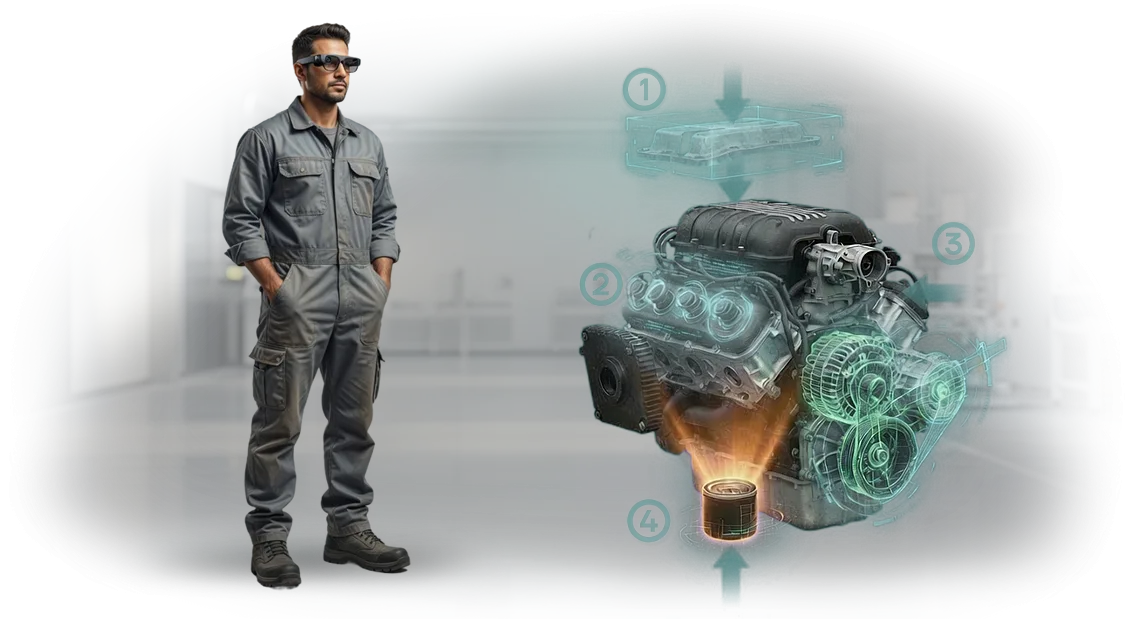
הוראות AR לתעשיית האנרגיה פותרות את זה: רמזים מופיעים ישירות בשדה הראייה, מעל הציוד האמיתי.
הכשרת כוח אדם במגזר האנרגיה היא יקרה: עמיתים מנוסים מוסחים מעבודתם, שטחי אימון, קורסים. אבל גם אחרי אלה, עובד חדש חושש לעבוד באופן עצמאי.
עם מציאות רבודה, הוא רואה תרחיש שלב-אחר-שלב על יחידה אמיתית — לומד מהר פי שניים ועושה פחות טעויות מהיום הראשון.
תיקון ציוד עם AR מקצר זמני השבתה: מהנדס מכוון את המצלמה ליחידה תקולה ומקבל היסטוריית נכסים, סיבות סבירות לכשל ורצף החלפה נכון.
אין צורך לחכות למומחה נדיר או לחפש בארכיונים — הצוות בשטח פועל בביטחון ובמהירות.
אנחנו עוזרים לחברות אנרגיה לטפל בכאב הזה: אנו מפתחים הוראות AR, תוכניות הכשרה ותמיכה בתיקונים המותאמים לציוד ספציפי. ההטמעה מחזירה את עצמה לאחר מניעת השבתת חירום ראשונה וממשיכה להפחית סיכונים בכל מתקן.
מה מדריכי תיקון אינטראקטיביים מספקים
כל שעה של השבתת ציוד היא יקרה: בעוד עובד מחפש את הסעיף הנכון במדריך נייר או מפענח תרשים מורכב, הייצור מפסיד כסף. זה קריטי במיוחד במתקני אנרגיה, שבהם אפילו עיכוב קטן בתיקון גורם להפסדים חמורים.
מדריכי AR פותרים את הבעיה הזו — רמזים מופיעים ישירות על הציוד, והמומחה רואה מה לעשות מבלי לעזוב את המשימה.
הכשרת עובדים מהירה
עובד חדש כבר לא תלוי במנטור ולא מבזבז שבועות בלימוד תקנות. רמזים אינטראקטיביים מדריכים אותו שלב אחר שלב, כך שהעובד מגיע לתפוקה מלאה תוך ימים, בעוד עמיתים מנוסים לא מוסחים מהמשימות שלהם.
פחות שגיאות תיקון
הוראות AR שלב-אחר-שלב מציגות את רצף הפעולות הנכון ומתריעות מפני טעויות נפוצות. הסיכון לדילוג על שלב חשוב או ערבוב חלקים ממוזער, ואיכות התיקון נשמרת עקבית גם בקרב עובדים חדשים.
בטיחות כוח אדם
עבודה על ציוד אנרגיה דורשת תשומת לב מיוחדת. רמזי AR מזכירים לעובדים אמצעי בטיחות ומונעים סטייה מרצף הפעולות הבטוח. זה מפחית את הסיכון לפציעות ותאונות, ולכן מקצר זמני השבתה ועלויות נוספות.
מהירות עבודה
כל המידע נמצא מולך — אין צורך לרוץ למסמכים או לפתוח מחשב נייד. פעולות מסתיימות מהר יותר, הצוות מספיק יותר במשמרת, וזמן התיקון מתקצר. כתוצאה מכך, הציוד חוזר לעבודה מהר יותר, והלקוח מרוויח יותר הכנסות.
פורמטי הטמעה: בחרו את המתאים למשימות שלכם
כל פורמט הטמעה של AR ו-VR נותן מענה למשימה משלו: מהחלפת הוראות נייר ועד אימון לתרחישי חירום. להלן השוואה שתעזור לכם להבין איזו אפשרות מתאימה לכם: לפי סוג עובד, מורכבות פעולה ותקציב.
קל לשלב בין הפורמטים: מדריכי AR ניידים מכסים פעולות יומיומיות, בעוד סימולטורי VR מטפלים בהכשרת עובדים חדשים ותרגול תרחישים נדירים.
השוואת פורמטים
| פורמט | למי זה מיועד | מה זה נותן ללקוח |
|---|---|---|
| מדריכי AR ניידים | צוותי שטח, שירותי תיקון, אתרים מרוחקים | רמזים שלב-אחר-שלב ישירות על הציוד דרך טאבלט או סמארטפון — קליטה מהירה, פחות טעויות |
| משקפי AR | מפעילים עם ידיים תפוסות; עבודות הרכבה והפעלה מורכבות | מידע בשדה הראייה, ללא שימוש בידיים, בקרת רצף מבלי לעזוב את הפעולה |
| סימולטורי VR | מרכזי הכשרה, חניכים, תרגול תרחישי חירום ונדירים במתקני אנרגיה | שקיעה מלאה ללא סיכון או עצירת ייצור; המיומנות מתגבשת לפני הגעה לאתר אמיתי |
אנחנו עוזרים לכם לבחור פורמט ולהתאים אותו לתקנות שלכם: אנו מעריכים תרחישים טיפוסיים, מורכבות פעולות ורמות מיומנות של צוות, ואז מרכיבים פתרון שמשתלב בתהליכים קיימים.
כתוצאה מכך, הלקוח מקבל זמן הכשרה מופחת, פחות טעויות במהלך תיקונים ותחזוקה, ובקרה ברורה על אופן תרגול המיומנויות של העובדים.
שלבי פרויקט: מהבריף ועד ההשקה
אנחנו עובדים בשלבים כך שתראו תוצאות תוך מספר שבועות ותוכלו להשפיע על הפרויקט בכל איטרציה. כל שלב מסתיים בתוצר ברור — מתרחיש ועד הוראה מוכנה על טאבלט. זה שומר על שקיפות התהליך ומבטיח השקה חלקה.
- בריף ואודיט — אנו מנתחים אילו פעולות צריך להפוך למציאות רבודה, היכן זמן מבוזבז והיכן מתרחשות שגיאות. אנו מציבים יעדים וקריטריוני הצלחה.
- יישור תרחיש — אנו מציגים את ההיגיון של ההוראה העתידית, דנים בו עם הטכנולוגים ומחלקת הבטיחות שלכם. אתם מאשרים את התוכן לפני תחילת הפיתוח.
- הפקת תוכן AR — אנו יוצרים מודלי תלת-ממד ומצמידים רמזים לציוד האמיתי. אנו מכינים גרסת טיוטה לבדיקה.
- בדיקת פיילוט — אנו מריצים את ההוראה במתקן אחד יחד עם העובדים שלכם. אנו מודדים מהירות ביצוע וירידה במספר השגיאות.
- השקה והכשרה — אנו מסיימים את הגרסה, מאמנים צוות לעבודה עם ממשק AR ומוסרים את כל התיעוד.
- תמיכה ועדכונים — אנו תומכים בפרויקט, מעדכנים הוראות כשהתקנות משתנות, הרכב הציוד משתנה או מתווספות פעולות חדשות.
מה כלול בתוצר: ערכה להתחלה מהירה
אתם מקבלים לא רק אפליקציה, אלא ערכה מוכנה לשימוש שכבר הותאמה לציוד ולמשימות שלכם. ההשקה אורכת ימים, לא חודשים: כל מה שצריך לתפעול מורכב בהזמנה אחת — מהתקנה ועד עדכוני תרחישים שוטפים.
- אפליקציית AR מוכנה לטאבלטים וסמארטפונים — עובדת על מכשירים שכבר קיימים אצל העובדים, אין צורך לקנות משקפיים יקרים.
- מודלי תלת-ממד דיגיטליים של הרכיבים והמכלולים שלכם עם רמזים ברורים: המכונאי רואה איזה חלק להסיר, באיזה סדר ואיזה כלי להשתמש.
- ספריית תרחישים שלב-אחר-שלב: תחזוקה, תיקון, אבחון, הפעלה. קל להרחיב ולשנות תרחישים כדי להתאים לתקנות חדשות.
- מערך תיעוד — מדריכי התקנה, הגדרה, עדכון וניהול מערכת, כולל הוראות למחלקת התפעול.
- הכשרת עובדים: אנו מקיימים מפגשים פרונטליים ומקוונים למהנדסים, טכנולוגים וצוות תחזוקה. לאחר ההכשרה, המומחים משתמשים בהוראות בביטחון ויכולים לערוך תרחישים בעצמם.
- תמיכה בהשקה: אנו עוזרים לשלב הוראות AR בתהליכים יומיומיים, עונים על שאלות במהלך ההשקה ומתאימים תוכן לדרישותיכם.
- אחריות הטמעה ועדכונים מתוזמנים — המערכת לא מתיישנת חודש לאחר ההשקה ונשארת רלוונטית ככל שהציוד מתפתח.
מקרה בוחן: הפחתת זמני השבתה בתעשיית האנרגיה
כל שעת השבתה במתקן אנרגיה היא לא רק אובדן ייצור אלא גם מפל של בעיות לתהליכים נלווים: מנהלי רשת צריכים לחלק מחדש עומסים, צוותי תיקון מחפשים תיעוד, וציוד יקר עומד בטל.
בפרויקט עבור ספקית חשמל גדולה, SeverEnergo, ראינו את זה במספרים: זמן התיקון הממוצע של תחנת שאיבה הגיע ל-14 שעות, וכל שעת השבתה עלתה בסכום שחושב לאחר האודיט.
במקום תקנות נייר, המרנו פעולות מפתח להוראות AR: הטכנאי רואה את תרשים היחידה ישירות על הציוד, מקבל רמזים שלב-אחר-שלב ובדיקות בטיחות.
זה חיסל את העיכובים העיקריים — חיפוש שרטוטים והמתנה למומחה בכיר בשטח. זה נתן לנו מקרה בוחן אמיתי של AR במגזר האנרגיה, שאנחנו now מרחיבים.
תוצאות הטמעת AR
התוצאות של הטמעת AR מדברות בעד עצמן. זמן תיקון סטנדרטי ירד ב-37% — מ-14 ל-9 שעות. שגיאות הרכבה פחתו פי שלושה, ותפוקת הצוות גדלה ברבע.
זמן ההשבתה החודשי של התחנה ירד ב-11 שעות — אלה מגה-ואט-שעות נוספים שהוזנו לרשת ללא הוצאות הון. במקביל, לא החלפנו ציוד ולא גייסנו קבלנים — רק עיצבנו מחדש תהליכים והכנסנו טאבלטים עם האפליקציה.
עבור הלקוח, הנקודה המרכזית היא שהאפקט הוכח כעמיד. שישה חודשים לאחר מכן, הם הזמינו הרחבה לחמישה מתקנים נוספים, והכשרת עובדים חדשים אורכת כעת שבוע במקום חודש. אנחנו ממשיכים לתמוך בפרויקט ולוודא שהמספרים לא יורדים.
מקרה בוחן זה של AR במגזר האנרגיה הראה: תוצאות הטמעת AR שהושגו כראוי מפחיתות זמני השבתה ומשפרות יעילות ללא השקעות גדולות.
איך לבחור את הפורמט המתאים למשימה שלכם?
אין פורמט "נכון" יחיד — האפשרות המתאימה נקבעת לפי המשימות שההוראה צריכה לפתור.
אם עובד צריך לעקוב אחר רצף מורכב של 20–30 פעולות, מדריכים אינטראקטיביים ייעודיים עובדים טוב יותר: הם מדריכים את המפעיל שלב אחר שלב ומפחיתים את הסיכון לשגיאות.
לפעולות מהירות, כמו החלפת חלק מתכלה, מספיקה רשימת בדיקה קצרה עם רכיבים מודגשים.
קריטריוני הבחירה ל-AR פשוטים: תדירות פעולה, מורכבות ותנאי עבודה. לפעולות תכופות ופשוטות — רמז קומפקטי; למשימות נדירות ומורכבות — מדריך מלא שלב-אחר-שלב; למצבי חירום — קריאה מהירה למומחה.
חשוב גם האם מומחה יכול להסתכל על מסך טאבלט או עונד כפפות מגן — זה קובע את סוג המכשיר ואת אופן העברת המידע.
הצוות שלנו עוזר לכם לבחור את הפורמט הנכון לפני תחילת הפיתוח: אנו מנתחים איך העבודה מתבצעת בפועל ומציעים פתרון שעובדים ישתמשו בו מבלי לאבד ריכוז.
לעתים קרובות, בתוך פרויקט אחד, אנו משלבים מספר פורמטים — למשל, רמזים קצרים על פס הייצור ומדריכים אינטראקטיביים מלאים לתחזוקה. כך אתם מקבלים לא "טכנולוגיה לשם טכנולוגיה" אלא כלי שמכשיר כוח אדם מהר יותר ומפחית השבתות ציוד.
פורמט שנבחר כראוי משפיע ישירות על מהירות ההשקה והבטיחות. באמצעות קריטריונים אלה, תוכלו לנסח במדויק את משימת הפיתוח — ואנחנו נספק את הפתרון במסגרת הזמן המוסכמת עם אחריות לתמיכה.
התייחסות לחששות נפוצים
ספקות לפני הטמעת AR הם טבעיים. אספנו את השאלות הנפוצות ביותר ממנהלים וענינו עליהן ישירות.
מה קורה אם הוראת ה-AR מפסיקה לעבוד?
תקלת ציוד היא מצב נורמלי, וצפינו את זה. אנו מספקים אחריות עבודה: אם משהו נכשל באשמתנו, נתקן זאת בחינם ובמהירות.
איך מעדכנים הוראות כשהתקנות משתנות?
התוכן מאוחסן במערכת ניהול קלה לשימוש. העובד שלכם יכול לבצע עריכות, ואנחנו מטפלים בעדכונים במתכונת מפתח.
האם קשה להטמיע AR בסביבת ייצור קיימת?
ההטמעה אינה דורשת עצירת סדנאות ובדרך כלל אורכת מספר שבועות. אנו מתאימים הוראות לתהליכים שלכם ומאמנים צוות.
מה אם עובדים מסרבים להשתמש בפורמט החדש?
הוראת AR אינה מחליפה מומחה אלא משמשת כעוזר מהיר: כוונו את הטאבלט וקבלו רמז. ההכשרה אורכת שעה.
עד כמה זה אמין בעבודה במגזר האנרגיה?
יש לנו ניסיון עם פרויקטים תעשייתיים, כולל במגזר האנרגיה. ההוראות בנויות על ציוד מקצועי — אתם מקבלים תוצאה יציבה.
הזמינו פיתוח וקבלו פתרון עובד
אתם יודעים כמה יקרה יכולה להיות טעות בתחזוקת ציוד תעשייתי: עצירת קו, השבתת צוות, תיקון לא מתוכנן. אנחנו עוזרים למפעלי אנרגיה להימנע מההפסדים האלה עם הוראות AR שמצמידות רמזים ישירות לציוד.
זה לא ניסוי לשם טכנולוגיה אלא כלי שכבר מפחית זמן הכשרה ומספר שגיאות עבור הלקוחות שלנו.
כדי שתוכלו להעריך את האפקט באתר שלכם, אנחנו מתחילים בייעוץ AR ראשוני: אנו מנתחים את המשימות שלכם, מראים היכן מציאות רבודה תניב תוצאות מהירות ומציעים אזור פיילוט.
אם הפתרון מתאים, אנו מפתחים הוראות לציוד שלכם ומכניסים אותן לפעולה. אין צורך להבין בפרטים טכניים: אנחנו מטפלים בכל המחזור — מאודיט ועד השקה והכשרת עובדים.
כשאתם פונים אלינו, אתם מקבלים:
- אודיט של תקנות קיימות ותוכנית להמרתן להוראות AR;
- אב-טיפוס על הציוד שלכם — אתם רואים את התוצאה לפני פיתוח מלא;
- הוראות AR עובדות המשולבות בתהליכים שלכם;
- הכשרת עובדים ומדריך לשימוש עצמאי;
- תמיכה טכנית ועדכונים לאחר ההטמעה;
- תקציב שקוף ולוחות זמנים קבועים לפרויקט.
אתם יכולים להזמין הוראות AR כבר עכשיו — פשוט כתבו לנו. פיתוח AR למגזר האנרגיה בצוות שלנו כולל לא רק יצירת תוכן אלא גם תמיכה בכל השלבים.
השאירו פנייה לייעוץ AR, ונראה לכם איך הציוד שלכם יכול להתחיל לעבוד בצורה בטוחה ומהירה יותר.