

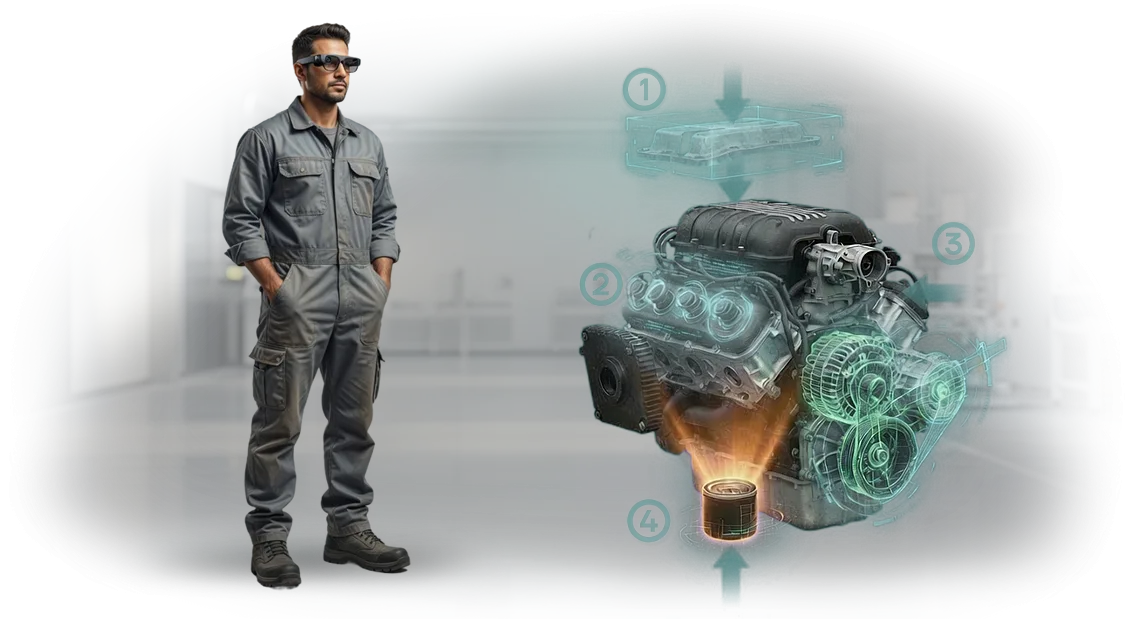
עוזר AR מרחוק: למה הוראות רגילות לא עובדות
הוראות תעשייתיות קונבנציונליות בדרך כלל מפסידות לייצור בעולם האמיתי. מכונה חדשה דורשת שבועות של הכשרת צוות, המפעיל חושש לעשות טעות, וטכנאי מבלה שעות בחיפוש אחר העמוד הנכון בנוהל רב-עמודים.
התוצאה היא השבתת ציוד, זמן אבוד ועצבים מרוטים בקרב עובדים שאמורים לעבוד במקום לפענח דיאגרמות מורכבות.
טעויות תיקון עולות יותר מהתיקון עצמו: רכיב שבור, ביקור נוסף של מומחה, עצירת קו. אפילו צוות מנוסה אינו חסין מפני רשלנות כאשר יש לזכור עשרות פעולות ברצף קפדני.
עובד חדש צריך לעבור השתלבות במשך חודשים, עם חונך שמוקצה לו שכבר עמוס במשימות מתוכננות.
כאן נכנס לתמונה עוזר ה-AR המרחוק. הוא מציג הדרכה שלב-אחר-שלב ישירות על הציוד: העובד רואה מה לעשות ובאיזה סדר, מבלי להיות מוסח על ידי תיעוד נייר.
זה מקצר את הכשרת הצוות משבועות לימים, מפחית את מספר טעויות התיקון, ומחזיר את השבתת הציוד למינימום.
אנחנו מיישמים פתרונות כאלה כבר 10 שנים ורואים תוצאות כבר אחרי פיילוט ראשון.
ציוד מקצועי וכלים מכווננים היטב מאפשרים לנו להתאים במהירות את המערכת למכונות ולנוהלים הספציפיים של הלקוח, מבלי לבנות מחדש תהליכי ייצור.
עוזר AR מרחוק אינו דורש רקע טכני מהעובד — סמארטפון או טאבלט מספיקים כדי לקבל את ההוראה הנכונה ברגע הנכון.
הוראות שנהגו לאסוף אבק בארונות הופכות לכלי עבודה שתמיד בהישג יד. הצוות מגיע לפרודוקטיביות תקינה מהר יותר, התחזוקה נטולת שגיאות, והשבתת הציוד מפסיקה להיות כאב ראש למנהל.
זה בדיוק מה שנותן מענה לכאב המרכזי של הייצור: איבוד זמן וכסף על הכשרה לא יעילה וטעויות תכופות.
מה יישום הוראות AR נותן למפעל
יישום הוראות AR מספק יתרונות בכל רמה: מפעילים עובדים בביטחון רב יותר, מהנדסים מגיבים מהר יותר לסטיות, ומנהלים מקבלים יכולת שליטה במקום "קופסה שחורה".
פחות טעויות בביצוע נוהלים
עובד רואה הדרכה שלב-אחר-שלב ישירות על הציוד ולא מוסח על ידי הוראות נייר, טאבלטים או זיכרון. זה חשוב במיוחד במצבים חריגים כאשר המחיר של פעולה שגויה הוא עצירת קו או אצווה פגומה. הפחתת חלקו של הגורם האנושי מורידה ישירות עלויות ומשפרת בטיחות.
השתלבות מהירה של עובדים חדשים במשמרת
הכשרת עובדים שנהגה לקחת שבועות מצטמצמת לכמה ימים. מפעיל חדש מקבל הוראות AR בזמן אמת: המערכת מדגישה את הרכיב הרלוונטי, מציגה את רצף הפעולות ובודקת את התוצאה.
החונך עוקב אחר ההתקדמות מרחוק ומתערב רק כשבאמת צריך, בעוד המפעל מפסיק להיות תלוי ב"שומר ידע" יחיד.
תמיכה מרחוק ללא ביקור מומחה באתר
כאשר מהנדס נדרש במספר אתרים בו-זמנית או במשמרות שונות, עוזר ה-AR המרחוק מאפשר לו לראות את מקום העבודה דרך עיניו של המפעיל.
המומחה מייעץ, מצייר ישירות בשדה הראייה של העובד, ועוזר לתקן תקלה תוך דקות, לא ימי המתנה. עבור מפעלים וסניפים מבוזרים, זה אומר חיסכון בתקציב על נסיעות עסקים והפחתת השבתות.
שקיפות תהליכית למנהל
כל פעולה שהושלמה משאירה עקבות דיגיטליות: מה נעשה, כמה זמן זה לקח, והיכן התרחשו סטיות. המנהל רואה צווארי בקבוק ומקבל החלטות על סמך עובדות ולא ניחושים.
זה מאפשר להתאים נוהלים, לחזק הכשרה ולשפר בהדרגה את היעילות הכוללת של הייצור.
פורמטים של עוזר AR מרחוק למשימות הייצור שלך
במתחם הייצור, כל דקת השבתה יקרה, ומציאת מומחה צר אופקים לכוונון דחוף יקרה עוד יותר.
עוזר ה-AR המרחוק פותר את הבעיה הזו: העובד שלך רואה הדרכה ישירות על הציוד, בעוד מומחה מתחבר מרחוק ומנחה אותו בזמן אמת.
עבור אנרגיה, נפט וגז, כרייה וטלקום, אנו בוחרים פורמט שמכסה בדיוק את המשימה שלך — מבלי לשלם יותר מדי עבור תכונות מיותרות.
כל הפורמטים עובדים על חיבור מאובטח ואינם דורשים הכנה מיוחדת מהצוות. ההבדל הוא בתרחיש השימוש: האם אתה צריך לתקן תקלה במהירות, לבצע תחזוקה שוטפת בבטחה, או להכשיר עובד חדש.
| פורמט | למי זה מיועד | מה זה נותן ללקוח |
|---|---|---|
| שיחת וידאו עם סימוני AR | אנרגיה, טלקום — פתרון תקלות מהיר | המהנדס בשטח רואה חיצים ותוויות המוצגות על גבי ציוד אמיתי. זמן הפתרון יורד משעות לדקות, והקריאה נסגרת במגע הראשון. |
| הוראות AR שלב-אחר-שלב | נפט וגז, כרייה — מתקנים מורכבים ומסוכנים | העובד מבצע פעולות אך ורק לפי הנוהל; המערכת מדגישה את השלב הבא ומונעת דילוג על שלב קריטי. הסיכון לטעויות מופחת, ומנהל המשמרת רואה את סטטוס הביצוע מרחוק. |
| בקרת AR וקבלה | אנרגיה, טלקום — אימות התקנה ותחזוקה | מומחה מרחוק מאשר את תקינות העבודה ללא ביקור באתר. אתה חוסך בנסיעות עסקים ומאיץ את הפעלת הציוד. |
| הכשרת צוות עם AR | נפט וגז, כרייה — עובדים חדשים ורוטציית צוות | עובד חדש מתעדכן מהר יותר על ציוד אמיתי, בעוד מדריך יכול להנחות בו-זמנית כמה חניכים ממשרד אחד. איכות ההכשרה זהה בכל האתרים. |
קל לשלב בין הפורמטים: למשל, התחל עם הכשרת AR, ולאחר מכן השתמש באותו תרחיש דיגיטלי לבקרה ותמיכה מרחוק. אנו נייעץ לך על השילוב הטוב ביותר למשימות, לעומס העבודה ולרמת המיומנות של הצוות שלך.
איך פועל פרויקט היישום: מבריף ועד השקה
יישום עוזר AR מרחוק אינו רכישה חד-פעמית אלא פרויקט עם מסלול ברור. אנו מובילים את הלקוח מהבריף ועד ההשקה ומגבים את התוצאה בתמיכה, כך שאתה תמיד יודע היכן אתה נמצא ומה תקבל בסופו של דבר.
- בריף פיתוח — אנו צוללים לתוך המשימות שלך: אילו פעולות אנו מכסים, כמה עובדים מעורבים, ואיזה ציוד אנו מתחזקים. אנו מתעדים יעדים וקריטריוני הצלחה כך שהפרויקט מכוון לתוצאה מדידה כבר מההתחלה.
- תוכנית והצעה מסחרית — אנו מגדירים שלבים, לוחות זמנים והיקף עבודה. אתה מאשר את ההיקף, ואנו קובעים את התקציב והציפיות — ללא עבודה נסתרת באמצע הדרך.
- יישור פרויקט — אנו מציגים את המבנה של הוראות ה-AR העתידיות ודנים בלוגיקה של התרחישים ובממשק. בשלב זה, אתה רואה בדיוק כיצד עובדים יעבדו עם המערכת ויכול לבצע עריכות לפני תחילת הפיתוח.
- הכנת תוכן — אנו מפתחים תרחישים שלב-אחר-שלב, מתאימים תיעוד טכני ויוצרים הנחיות חזותיות. המהנדסים המומחים שלך משמשים כמקור הידע, בעוד אנו אורזים אותו להנחיות ברורות לכל עובד.
- השקת הוראות AR — אנו פורסים את המערכת על המכשירים שלך או על ציוד מקצועי המסופק במסגרת הסכם שכירות. אנו מגדירים גישה, עורכים מפגש הדרכה קצר, ועובדים מתחילים להשתמש בעוזר כבר ביום הראשון.
- תמיכה במערכת — אנו נשארים בקשר לאחר ההשקה: אנו מעדכנים הוראות כאשר נוהלים משתנים, עונים על שאלות ועוזרים להרחיב תרחישים. אם תרצה להוסיף רכיב או פעולה חדשים, זו תהיה תוספת מהירה, לא פרויקט חדש מאפס.
התוצאה היא תהליך שקוף שבו אתה שולט בתוצאה ואנו אחראים לאיכות וללוחות זמנים. אתה מקבל כלי עבודה שמפחית טעויות ומאיץ הכשרת צוות, לא רק מצגת יפה.
מה כלול במסירה של פתרון AR תעשייתי
כאשר אתה מזמין עוזר AR מרחוק, אתה מקבל לא רק אפליקציה אלא פתרון שלם מוכן לשימוש שניתן לפרוס בשבוע הראשון.
אנו מרכיבים את הפתרון עבור משימת תיקון או תחזוקה סטנדרטית ספציפית על הציוד שלך — כל שנותר הוא למסור אותו לצוות שלך.
- אפליקציית AR לעובד — תוכנית שרצה על טאבלטים, סמארטפונים או משקפיים חכמים ישירות במתחם הייצור. המומחה רואה הנחיות שלב-אחר-שלב המוצגות על גבי המכונה האמיתית ומבצע פעולות ללא הוראות נייר.
- תוכן תעשייתי ומודלים תלת-ממדיים — תרחישים שלב-אחר-שלב לתיקון, כוונון ואבחון, שהוכנו מהתיעוד שלך. סימונים ישירות על חלקי הציוד מראים מה והיכן לסובב, ללחוץ או לבדוק.
- ממשק מומחה ליצירת הוראות — תוכנית נוחה שבה הטכנולוג או המהנדס שלך יכול להרכיב תרחישים חדשים בעצמו. אין צורך בכישורי תכנות: פשוט העלה תמונה וסדר את השלבים.
- לוח ניהול למנהל — דשבורד נפרד המציג באילו הוראות משתמשים, אילו עובדים השלימו הכשרה, ואילו טעויות מתרחשות לרוב. ניהול גישה ועדכוני תוכן אורכים דקות.
- הכשרת עובדים — אנו עורכים מפגש עבור הצוות שלך כך שמכונאים ומכווננים יתחילו להשתמש במערכת מהיום הראשון. אנו גם מספקים מדריכי עזר קצרים ללימוד עצמי.
- עדכוני הוראות — כאשר נוהלים משתנים, אתה מבצע עריכות בממשק המומחה, והן הופכות זמינות לכל העובדים באופן מיידי. אין צורך להדפיס ולהפיץ מסמכי נייר.
- תמיכה ותחזוקה — למשך תקופת החוזה, אנו עוקבים אחר פעילות יציבה של הפתרון, עוזרים בהגדרות ומשכללים תוכן לפי המשימות החדשות שלך.
בסופו של דבר, אתה מקבל כלי עבודה אחד: מיצירה ועדכון של הוראות ועד לניטור היישום שלהן במתחם הייצור. זה סוגר את נושא הכשרת עובדים חדשים, מפחית את הסיכון לטעויות ומקצר את השבתת הציוד.
מקרה בוחן: הוראות AR קיצרו את זמן תיקון המדחס
כאשר יצרן ציוד המדחסים פנה אלינו, המשימה נשמעה פשוטה: להפחית השבתות ולהאיץ תיקונים.
אבל מאחוריה היה כאב אמיתי — במפעל חסרו מהנדסים מנוסים, ועובדים חדשים בילו שעות בחיפוש תקלות כי הוראות נייר לא סיפקו תמונה ברורה.
כל שעת השבתה של ציוד משמעותה אובדן הכנסות, ולכן ההנהלה חיפשה פתרון שיעביר את הניסיון של מומחים בכירים למכונאים צעירים.
פיתחנו הוראות AR שעובדות כעוזר מרחוק. הטכנאי מכוון את מצלמת הטאבלט אל המדחס ורואה הנחיות ישירות על המעטפת: איזו יחידה לבדוק, באיזה סדר להבריג את המחברים, והיכן ממוקם חיישן הלחץ.
זו לא דיאגרמה מופשטת אלא שכבה מדויקת על ציוד אמיתי — העובד מבצע בדיוק את הצעדים שמהנדס בכיר העומד לידו היה נוקט.
תוצאות היישום
ההשפעה הייתה ניכרת כבר בחודש הראשון. זמן תיקון המדחס ירד ב-35% — במקום שלוש שעות, הצוות סיים בשעתיים. מספר שגיאות ההרכבה ירד בחצי, ועובדים חדשים הגיעו לקצב עבודה תוך שבוע במקום חודש.
מנהל הייצור ציין: "נהגנו לפחד לאבד מכונאי מנוסה — עכשיו הידע שלו מובנה בהוראה ועובד עבורנו גם כשהוא בחופשה."
הפרויקט היה כה מוצלח עד שהלקוח הרחיב אותו לקווי ייצור אחרים. הוראות AR משמשות כעת לא רק לתיקונים אלא גם לתחזוקה מתוכננת, ואנו ממשיכים לתמוך במערכת ולשכלל אותה למשימות חדשות. זה מקרה שבו תוצאות מדברות חזק יותר מהבטחות.
איך לבחור פורמט הוראות AR למשימה שלך?
בחירת פורמט הוראות AR מתחילה לא בטכנולוגיה אלא בשאלה: מה בדיוק צריך להשתנות בדרך שבה העובדים שלך עובדים?
אם המשימה היא להפחית טעויות במהלך הרכבה או תחזוקה של יחידה מורכבת, מצב שלב-אחר-שלב עם הדגשת חלקים ואימות פעולות מספיק.
אם אתה צריך להאיץ הכשרת עובדים חדשים או להסיר תלות במהנדס חונך, כדאי לבנות מאגר ידע מלא עם סרטונים, דיאגרמות ותרחישים לדגמי ציוד שונים.
הגיוני לקשור את היקף הפרויקט למספר הפעולות שברצונך לכסות. לבעיה מקומית, 3–5 מסלולים מספיקים: ניתן להשיק אותם תוך מספר שבועות.
לאפקט מערכתי — כאשר עשרות מומחים באתרים שונים משתמשים בעוזר ה-AR המרחוק — תצטרך ספריית הוראות ואינטגרציה עם מערכת החשבונאות שלך.
בשני המקרים, אנו מתחילים בפיילוט: אנו לוקחים פעולה אמיתית אחת, הופכים אותה לדיגיטלית ומודדים את התוצאה במתחם הייצור, לא במצגת.
דרישות ה-AR נקבעות על ידי הסביבה: תחנה נייחת עם טאבלט, עובדים ניידים עם סמארטפונים, או עבודה בתנאי תאורה לקויים.
עבור כל תרחיש, אנו בוחרים פורמט פלט מתאים, אבל מבחינת תקציב ולוחות זמנים, משהו אחר חשוב — לוודא שהוראות נפתחות על המכשיר שכבר קיים אצל העובד.
זה מוריד את חסם הכניסה ומאפשר לפרויקט להתרחב בהדרגה מבלי לשלם יותר מדי על צי נוסף.
שקיפות בשלב הבחירה היא חלק מהעבודה שלנו. אנו מציינים לוחות זמנים ריאליים וגבולות פורמט לפני ההתחלה, לא במהלך התהליך.
לכן, בשלב הבריף אתה מקבל לא "תעריף שעתי" אלא תוכנית ברורה: אילו פעולות אנו הופכים לדיגיטליות, על אילו מכשירים זה עובד, כמה זמן ייקח היישום, ואיזה אפקט אתה יכול למדוד אחרי חודש שימוש ראשון.
שאלות נפוצות וחששות לפני תחילת פרויקט
חששות לפני התחלה הם נורמליים. בתעשייה, כל עצירה של מחזור הייצור יקרה, ולכן יישום עוזר AR מרחוק מתוכנן כך שלא יפריע לתהליכים קיימים ולא ידרוש החלפת ציוד.
הנה תשובות לשאלות שעולות לרוב בפגישות עם מנהלים טכניים ומנהלי ייצור.
האם זה לא קשה מדי ליישם הוראות AR? זו טכנולוגיה חדשה, אחרי הכל…
היישום אינו דורש בנייה מחדש של הייצור. אנו מתאימים את המערכת לנוהלים ולציוד שלך, וההגדרה הבסיסית אורכת מספר ימים. המומחה שלנו מלווה את כל התהליך, מההגדרה ועד להכשרת הצוות.
כמה זמן לוקחת ההשקה?
פרויקט טיפוסי אורך שבועיים עד ארבעה שבועות מאישור הבריף. אם אתה צריך את זה מהר, אנו משיקים פיילוט באתר אחד תוך מספר ימים כדי שתוכל להעריך את האפקט על משימות אמיתיות ולהחליט על המשך פריסה.
מה אם יש לנו ציוד שונה וחלק מהקווים ישנים?
עוזר ה-AR המרחוק עובד על גבי התשתית שלך, לא במקומה. הוא דורש רק טאבלט או סמארטפון שבידי המנהל וגישה לתיעוד טכני.
מומחה בקצה השני מתחבר לכל יחידה, רואה אותה בפריים ומצביע על הבעיה ישירות על התמונה.
האם עובדים לא יתקשו להבין איך להשתמש בזה?
הממשק מוכר: כוון את המצלמה, ראה את הסימונים, השלם את השלב. ההכשרה אורכת לא יותר משעה, והמפעיל עובד עם הידיים, לא עם מדריך נייר. עבור עובדים מנוסים, זה מאיץ איתור תקלות; עבור חדשים, זה מקצר את זמן ההשתלבות.
אילו ערבויות יש לנו שזה יעבוד עבורנו?
אנו מתחילים בפיילוט ומתעדים תוצאה מדידה: זמן תיקון, מספר שגיאות ומהירות הכשרת צוות. הערבות מגובה בחוזה — אם המדדים לא משתפרים, אתה לא משלם על הרחבת הפרויקט לאתרים אחרים.
בואו נדון בתרחיש הוראות ה-AR שלך
כל הוראה לציוד תעשייתי מתחילה לא בשרטוט אלא בשאלה: מה בדיוק העובדים שלך צריכים?
לכן הצעד הראשון הוא שיחה על התרחיש שלך: היכן מתרחשות טעויות, אילו פעולות הן היקרות ביותר, ומי עובד עם הציוד.
עוזר ה-AR המרחוק שלנו אינו פתרון "מדף" אלא כלי שמתאים את עצמו לאתר שלך. אנו מנתחים את המשימה, מציעים פורמט ומראים כיצד הטכנולוגיה תשתלב בתהליכים הנוכחיים שלך — מבלי לעצור את הייצור או לבנות מחדש את העבודה.
מה תקבל אחרי פנייה אלינו
- ייעוץ לתרחיש שלך — אנו מנתחים היכן הוראות AR יניבו תוצאות מהירות והיכן הן לא נחוצות כלל.
- הערכת פרויקט למשימה שלך — לוחות זמנים, שלבים, היקף עבודה ותקציב ברור ללא תנאים נסתרים.
- אתר פיילוט — אנו משיקים בדיקה מוגבלת על פעולה אחת כדי שתוכל להעריך את התוצאה לפני הרחבה.
- תמיכה בכל שלב — אנו מלווים את היישום ומכשירים עובדים לעבודה עם הכלי.
- התחלה מהירה — תרחיש מוכן והוראות ראשוניות לפיילוט אורכים שבועות, לא חודשים.
דיון במשימה שלך אינו מחייב. אבל אחרי השיחה, תדע בדיוק אם AR מתאים לך, מה זה עולה, ומה זה יביא לייצור הספציפי שלך.
שלח בקשה להוראות AR — נשלח דוגמאות מהתעשייה שלך, נענה על שאלותיך ונציע את הצעד הבא. התחל בשיחה קצרה: 15 דקות שיחסכו לך חודשים של ניסוי וטעייה.