

תיקון טעויות: משקפי realwear ar brille מפחיתים זמן השבתה
כל שעה של השבתת ציוד כפויה היא הפסד ישיר: הזמנה שלא מולאה, פספוס מועדים, עלויות תיקון לא מתוכננות.
תקלה תמיד מגיעה בפתאומיות, וההתאוששות מתמשכת בגלל חיפוש אחר התיעוד הנכון, המתנה למומחה שהוזעק, או פעולות לא בטוחות של צוות התיקון.
לרוב, הבעיה אינה במכונה עצמה אלא באופן העברת הידע. הוראות נייר מתיישנות, עובדים מנוסים עוזבים, ועובדים חדשים עובדים על פי ניחושים.
טעות אחת בזמן החלפת רכיב קטן יכולה להפוך לזמן השבתה ממושך ולכשל שני — ובכך, העלויות עולות והתפוקה יורדת.
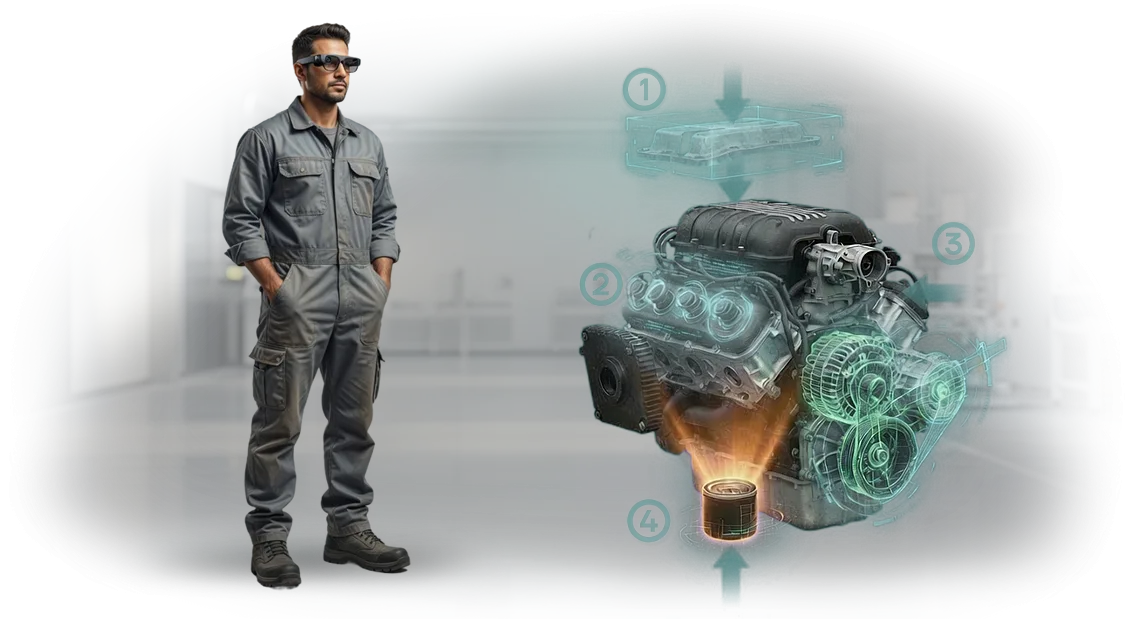
הוראות AR פותרות זאת אחרת. הטכנאי רואה הנחיה ברורה ישירות על הציוד: מה להבריג, באיזה סדר, היכן ללחוץ. טכנולוגיית realwear ar brille מציבה נוהל שלב-אחר-שלב מול עיניו, ומשאירה את הידיים חופשיות לעבודה. זמן התיקון מתקצר, מספר השגיאות יורד, והעובדים לומדים פעולות חדשות מהר יותר.
זו אינה פיתוח מעבדתי ניסיוני אלא כלי עבודה שכבר נמצא בשימוש בתעשייה. אנו מיישמים מערכות כאלה במפתח מלא: אנו חוקרים את הנוהלים, ממלייבים את ההוראות, מאמנים את הצוות ותומכים בהשקה.
כתוצאה מכך, הציוד שלכם עומד פחות, התיקונים מהירים יותר, והצוות שלכם רוכש מיומנויות בטוחות גם לרכיבים מורכבים.
מה הטמעת הוראות AR משנה על רצפת הייצור
השבועות הראשונים לאחר הטמעת הוראות AR בדרך כלל עוברים כמעט בלי לשים לב: העובדים מתרגלים לפורמט החדש, והמומחים הטכניים לומדים לנווט בין ההנחיות.
אבל תוך חודש, ההבדל המרכזי מתבהר — הזמן הדרוש להביא עובד לעצמאות בעבודה מתקצר באופן דרמטי.
עובד חדש כבר לא יושב שעות עם מדריכי נייר: הוא רואה פעולות שלב-אחר-שלב ישירות מולו ומבצע אותן מיד, במקום אחרי תיאוריה.
לאחר מכן מגיע דיוק התיקון. כשההוראה מוצגת על הרכיב האמיתי, הטכנאי לא צריך לזכור איזה בורג להסיר או היכן נמצא הנתיך. כל נקודות המפתח מודגשות, ורצף הפעולות לא משאיר מקום לניחושים.
טעויות שבעבר הובילו לפירוק חוזר ולהשבתה נעלמות — הציוד חוזר לפעולה בניסיון הראשון, מה שחוסך ישירות גם חלקי חילוף וגם זמן השבתה.
בטיחות ראויה לציון מיוחד. הנחיות AR מזהירות על אזורים מסוכנים, מזכירות על ציוד מגן ונעילות. העובד פועל פחות על פי ניחוש, מה שמפחית את הסיכון לפציעות ולנזק לרכיבים יקרים.
עבור רצפת הייצור, זה גם מפחית את העומס על המנטורים: מומחים מנוסים מפסיקים להיות מוסחים כל הזמן על ידי שאלות של עובדים חדשים ויכולים להתמקד במשימות שלהם.
ההשפעה מצטברת עם הזמן: ההכשרה מואצת, התיקונים הופכים צפויים, והצוות עובד בביטחון רב יותר גם עם ציוד מורכב. אחרי כמה חודשים, אתם שמים לב שהצוות מתמודד עם אותן משימות מהר יותר ועם פחות שגיאות.
זו התוצאה הכלכלית שמצדיקה את ההטמעה — היא נמדדת לא במספר הטכנולוגיות שהוטמעו, אלא בשעות שנחסכו ובשקט הנפשי של העובדים שלכם.
פורמטים של realwear ar brille למשימות רצפת ייצור
אותו תהליך טכנולוגי יכול להיות מוצג על נייר, טאבלט, סמארטפון או משקפיים — אבל בסדנה, כל פורמט עובד אחרת. עובד על סולם לא יכול לדפדף בטאבלט, ומתקין ששתי ידיו תפוסות מאבד מומנטום כשמוסח על ידי טלפון.
לכן בחירת הפורמט הנכון של AR אינה עניין של נוחות אלא עניין של מהירות ואיכות שירות.
להלן טבלת סיכום למשימות רצפת ייצור טיפוסיות. היא מראה איזה אמצעי מתאים לצוות שלכם, ולאחר מכן אנו מתאימים את התוכן לפורמט הנבחר.
| פורמט | משימות רצפת ייצור מתאימות | מה זה נותן ללקוח |
|---|---|---|
| טאבלט | תחזוקה מתוכננת, נוהלים מפורטים עם שרטוטים וסכמות | מסך גדול, קל לבדוק רכיבים; ההוראות לא יאבדו או יתלכלכו |
| משקפיים | עבודה בגובה, במקומות קשים לגישה, כששתי הידיים תפוסות | הידיים חופשיות, ההוראות תמיד מול העיניים; סיכון נמוך יותר לפספס שלב |
| סמארטפון | עזרים מהירים, פעולות קצרות, בדיקת רשימות | תמיד בהישג יד, אין צורך לרכוש ציוד; מתאים לתרחישים נדירים |
עבור רוב הסדנאות, שילוב עובד הכי טוב: טאבלט להכנה וסקירת משימה, משקפיים ישירות בשטח.
אנו עוזרים לכם לבחור את הפורמט למשימות וליכולות צוות השטח שלכם, ואנו מפתחים יישומי RealWear כך שהמפעיל יקבל את השלב הנכון ברגע הנכון.
בסופו של דבר, הצוות מתאמן מהר יותר, עושה פחות שגיאות, והנוהלים תמיד מעודכנים — עדכונים נעשים פעם אחת ומגיעים מיידית לכל הפורמטים.
כיצד אנו מפתחים הוראות AR: שלבי הפרויקט
בנינו את התהליך כך שאתם שולטים בכל שלב ומקבלים תוצאות ביניים. אתם משתתפים בכל האישורים המרכזיים, כך שהפתרון הסופי אינו מכיל הפתעות.
-
בריף וניתוח הפעולות הנוכחיות. אנו חוקרים כיצד העובדים מבצעים משימות ומתעדים קשיים טיפוסיים. זה מאפשר לנו ליצור הוראת AR שפותר בעיות אמיתיות ולא חוזרת על מדריך נייר.
-
אישור תרחיש. אנו מציגים את ההיגיון שלב-אחר-שלב של ההוראה העתידית: אילו פעולות והנחיות יופיעו במשקפיים. אתם מאשרים לפני תחילת הוויזואליזציה — שינויים בשלב זה הם מהירים ופשוטים.
-
הכנת מודלים תלת-ממדיים וממשק. אנו יוצרים מודלים של רכיבי הציוד והבקרות המותאמים למשקפי RealWear. העובד מקבל הנחיות מדויקות ללא טקסט מיותר ואינו מוסח מהעבודה.
-
הרכבת אב טיפוס. אנו מרכיבים דוגמה עובדת ובודקים אותה על הציוד שלכם. אתם רואים כיצד ההוראה מנחה את המפעיל בתנאים אמיתיים ויכולים להתאים פרטים לפני השקה מלאה.
-
השקת פיילוט. אנו בודקים את הפתרון עם עובדים בפועל, אוספים משוב ומשכללים את הפרטים. זה מפחית את הסיכון לדחייה ומשפר את יעילות ההטמעה.
-
השקה ותמיכה. אנו פורסים את ההוראות על כל המכשירים, מאמנים את הצוות ונשארים בקשר. כשהנוהלים או שלבי התהליך משתנים, אנו מעדכנים את התוכן מבלי לעצור את העבודה.
בסופו של דבר, אתם מקבלים הוראות שאנשים באמת משתמשים בהן בעבודה. ציר הזמן והשלבים של הפרויקט ברורים מראש, וכל ההחלטות המרכזיות מאושרות איתכם.
מה כלול בחבילת מסירת פתרון AR
בחבילת המסירה אנו כוללים כל מה שדרוש להשקת הוראות AR בסדנה: תרחישים, היישום, רישיונות, הדרכה ותמיכה. אין מסירה של "תסיימו לבד" — רק פתרון עובד הבנוי לפעולות שלכם.
הנה מה שפרויקט AR כולל:
- הוראות AR מוכנות. תרחישים שלב-אחר-שלב לפעולות שלכם: הרכבה, תחזוקה, אבחון, תיקון. הם נוצרים מהתיעוד והסרטונים שלכם ומותאמים למשקפיים.
- יישום למשקפיים תעשייתיים. עובד על מכשירים שכבר יש לכם, כולל RealWear: שליטה קולית, אלמנטים גדולים, עבודה ללא ידיים.
- רישיונות תוכנה ותוכן. תנאים שקופים — אתם הבעלים של התרחישים ויכולים לעדכן אותם כשהנוהלים משתנים.
- הדרכת עובדים. מפגשים למפעילים ומנהלים: הפעלת הוראות, ניהול המשקפיים וביצוע עריכות פשוטות ללא מתכנתים.
- תיעוד תפעולי. מדריכים קצרים: איך להפעיל, לפתוח את ההוראה ומה לעשות אם משהו משתבש.
- אינטגרציה עם מאגר הציוד שלכם. גישה לנוהלים וליומנים דרך המערכת הפנימית שלכם, כך שההוראות תמיד עדכניות.
- תמיכה באחריות. אנו עוזרים בהגדרה במהלך התקופה המוסכמת, עונים על שאלות ומעדכנים תרחישים כשהנוהלים משתנים.
לאחר המסירה, אתם לא נשארים לבד עם החומרה. אנו ממנים מהנדס אחראי על ההשקה ומספקים נקודות קשר לתקשורת מהירה — כך שהמשמרות הראשונות רצות בלי לעצור את הייצור.
מקרה בוחן: כיצד הוראות AR האיצו תיקון במפעל
במפעל לבניית מכונות "וקטור", עצירת קו אריזה משמעותה סדנה בטלה: המפעיל נאלץ לחכות למהנדס בכיר מבניין אחר, לחפור בסכמות נייר ולבדוק כל רכיב פעמיים.
התיקון הממוצע ארך ארבע שעות, וכל שעת השבתה גררה עלות שחושבה לאחר ביקורת. ההנהלה הציבה מטרה לצמצם את זמן התגובה ולהפוך תיקונים לנגישים לצוות רגיל.
הצענו פתרון המבוסס על משקפי AR תעשייתיים של RealWear: הוראה שלב-אחר-שלב מופיעה ישירות בשדה הראייה — חיצים, וידאו ורשימת בדיקה המוצגים על המכונה בפועל.
העובד רואה מה לסובב ועובד עם שתי ידיים, מבלי להסיט את המבט לטאבלט או לנייר. הפיתוח ארך שלושה שבועות, והכשרת שתי משמרות במפעל ארכה עוד יומיים.
מספרים אחרי החודש הראשון
לאחר ההשקה, המפעל מדד את התוצאה: זמן התיקון הממוצע ירד מארבע שעות ל-47 דקות, והעובדים פתרו 89% מהתקלות ללא קריאה למהנדס. החיסכון בזמן ההשבתה חושב לאחר ביקורת — מבלי לקחת בחשבון עבודה מתוכננת מהירה יותר.
שישה חודשים לאחר מכן, "וקטור" הזמינה סט שני של הוראות AR, הפעם לתחזוקה מתוכננת. הם גם ציינו תופעת לוואי: עובדים חדשים הופכים לפרודוקטיביים פי שלושה מהר יותר כי ההוראה מובילה אותם בכל שלב.
עבורנו, מקרה זה מאשר שהוראות AR מחזירות את ההשקעה במפעלים תעשייתיים תוך חודש-חודשיים.
כיצד לבחור את פורמט הוראת ה-AR הנכון?
בחירת פורמט הוראת ה-AR הנכון מתחילה לא בטכנולוגיה אלא במשימות המפעיל ובתנאי העבודה. לפעולות קצרות במרחב מוגבל, הנחיה שלב-אחר-שלב על המסך עובדת היטב — העובד רואה את השלב הבא מבלי להסיט את המבט מהציוד.
אם המשימה היא אבחון תקלה מורכבת, יש צורך במצב אינטראקטיבי, עם גישה לתרשימים, וידאו ודרך לבקש סיוע מרחוק.
אתם יכולים להעריך את הפורמט על ידי מענה על שלוש שאלות. עד כמה ידיו של העובד תפוסות בכלים? היכן נמצא הרכיב — מול העיניים או במקום קשה לגישה? וכמה מהר המשימה משתנה: פעולת קו או תיקון נדיר?
התשובות מצמצמות את האפשרויות: על קו ייצור בדרך כלל צריך הנחיות חזותיות קצרות; לתיקונים צריך הוראה מלאה עם ניווט רכיב-אחר-רכיב.
קריטריון נוסף הוא רמת המיומנות של הצוות. מהנדסים מנוסים יבינו במהירות תרשים תמציתי, בעוד מתחילים זקוקים לטקסט מפורט ולאישור בכל שלב. לכן אנו בוחרים פורמט לצוות ספציפי ולא מציעים תבנית אוניברסלית.
השורה התחתונה היא שאין פורמט "ממוצע" אחד שמתאים לכולם. אנו מנתחים את הנוהלים שלכם, סוגי התקלות ורמות המיומנות של העובדים, ואז מכינים אב טיפוס על משקפי RealWear ובודקים אותו במשמרת עבודה אחת. כך אתם מקבלים הוראת AR שבאמת מפחיתה את זמן הפעולה, לא רק הדגמה מרשימה.
שאלות נפוצות על הטמעת הוראות AR
אנו שומעים לעתים קרובות את אותן שאלות ממנהלי ייצור: האם ההטמעה תהיה מורכבת מדי, האם הטכנולוגיה תעבוד עם הציוד שלנו, כמה זמן תיקח ההשקה. אנו מתייחסים לחששות המרכזיים מראש — כך שתוכלו לראות איך זה עובד בפועל.
האם קשה להטמיע הוראות AR בתהליכים הנוכחיים?
לא. אנו עורכים ביקורת על הפעולות שלכם ומתאימים תרחישים לנוהלים הקיימים. מהנדסים לומדים לעבוד עם המשקפיים תוך כמה ימים, והעובדים פשוט עוקבים אחר ההנחיות במשקפיים. ההטמעה היא בשלבים, כך שהייצור לא נעצר.
האם הוראות AR תואמות לציוד שלנו?
כן. אנו עובדים עם רוב המכונות והכלים התעשייתיים. המהנדסים שלנו מתכננים הוראות דיגיטליות לדגמים ספציפיים, תוך התחשבות בכל כפתור ומנגנון. משקפי RealWear תואמים לתשתית הקיימת — אין צורך לשנות ציוד או תוכנה.
כמה זמן אורך הפיתוח וההשקה?
הוראות פשוטות מוכנות תוך כמה שבועות; פרויקטים מורכבים אורכים עד חודשיים. אנו קובעים את ציר הזמן המדויק לאחר הבריף ומתעדים אותו בתוכנית עם נקודות ביקורת. אתם רואים התקדמות בכל שלב ויכולים להתאים משימות.
אם עדיין יש לכם שאלה, השאירו בקשה. נשלח דוגמאות הוראות לתעשייה שלכם ונחשב צירי זמן למקרה שלכם.מוכנים לדון בפרויקט הוראות AR?
עובדים מבזבזים זמן בלימוד הוראות נייר, וטעויות בעבודה עם ציוד עולות ביוקר. הוראות AR במשקפי RealWear מציבות הנחיות ישירות בשדה הראייה: העובד רואה את רצף הפעולות ואינו מוסח על ידי מדריך. כתוצאה מכך, זמן ההכשרה מתקצר, זמן ההשבתה של הציוד יורד ומספר השגיאות פוחת.
אנו יכולים לעזור לכם להזמין פיתוח הוראות AR לציוד שלכם. נתחיל בייעוץ ראשוני ושאלון בריף קצר — מתוכו נבין את המשימות שלכם, נעריך צירי זמן ועלות פרויקט. נדון בפרטים ונכין הערכת פרויקט.
אנו עובדים לפי תהליך שקוף וברור מהיום הראשון:
- בריף וניתוח משימות. אנו חוקרים את הציוד שלכם, פעולות טיפוסיות ונקודות כאב של העובדים.
- עיצוב תרחיש ההוראה: פירוק העבודה לשלבים והנחיות.
- אישור אב טיפוס ממשק והיגיון ההנחיות.
- פיתוח היישום למשקפי AR ובדיקה בפעולות אמיתיות.
- השקת הפתרון והדרכת עובדים.
- תמיכה לאחר ההשקה: עדכון הוראות כשהנוהלים משתנים.
הייעוץ ושאלון הבריף נותנים לכם הזדמנות לקבל:
- הערכת עלות וציר זמן לפרויקט שלכם.
- תוכנית עבודה ברורה ללא שלבים נסתרים.
- המלצת פורמט: משקפי מציאות רבודה, טאבלטים או סמארטפונים.
- בדיקה על ציוד אמיתי לפני ההשקה.
- תמיכה טכנית ושיפור לאחר ההטמעה.
השאירו בקשה לייעוץ — נראה לכם איך זה עובד בפועל ונציע פתרון המותאם למשימה שלכם.