

משקפי AR חכמים לעומת הוראות נייר: איפה הכסף הולך לאיבוד
כאשר תיקון או התקנה של ציוד אורכים פי שניים מהנדרש, הבעיה היא לעתים קרובות לא כישורי הצוות. הסיבה האמיתית היא הוראות נייר: מאות עמודים, אותיות קטנות ודיאגרמות מורכבות.
טכנאי מבזבז 20–30 דקות בחיפוש אחר הסעיף הנכון במקום להתחיל לעבוד ישר.
כל שעה של השבתה כזו משמעותה קילוגרמים אבודים של מוצר או הזמנה שלא נמסרה בזמן. זה יקר במיוחד בקווי ייצור רציפים, שבהם עצירת מסוע הופכת לאובדן רווח משמעותי.
הוראות נייר גם לא יכולות לעמוד בקצב עדכוני הציוד: עובד משתמש בגרסה מיושנת, וההשבתה נמשכת עוד יותר.
שגיאות צוות הן סעיף העלות השני בגודלו. מתחיל שמפרק רכיב בפעם הראשונה מדלג על שלב חשוב או מהדק מחבר בצורה לא נכונה. התוצאה: קריאות שירות חוזרות, חלקים פגומים, ליקויים ואפילו החזרות של אצוות מוצרים. עבודה חוזרת ותיקונים נשארים נטל כבד על עלות המוצר.
הנקודה המרכזית היא שההפסדים האלה הם שיטתיים. הם חוזרים על עצמם עם כל תקלה, כל החלפת מפעיל וכל דגם מכונה חדש.
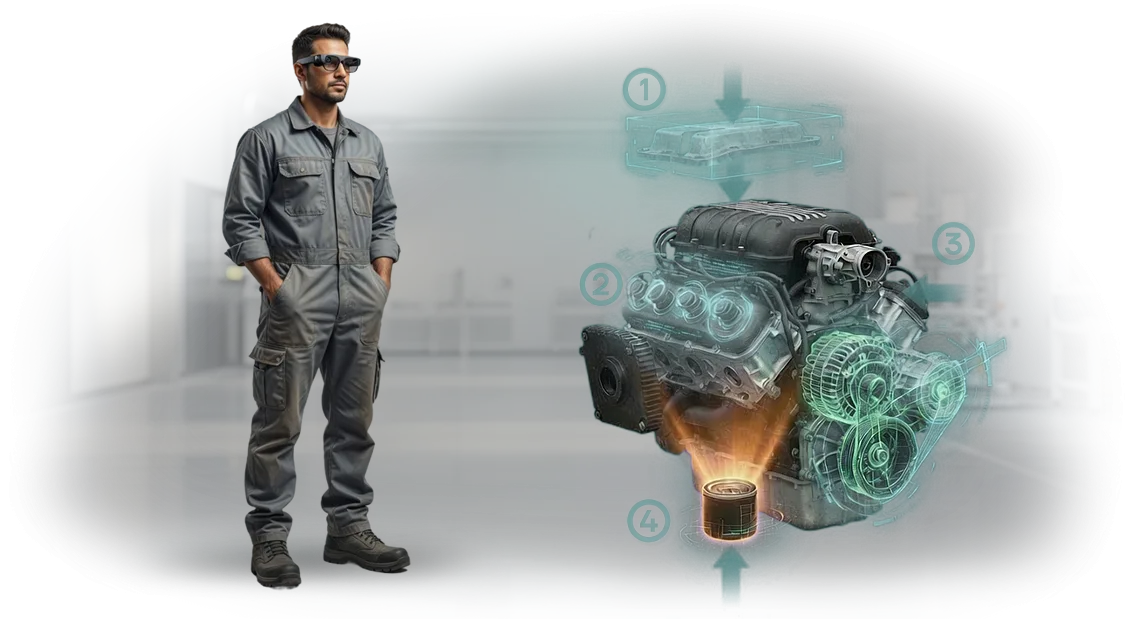
משקפי AR חכמים סוגרים את הפער הזה: הוראות שלב-אחר-שלב מוצגות ישירות על הציוד האמיתי, והעובד רואה את השלב הבא בלי להסיט את המבט לנייר. שגיאות מתחילים נעלמות, וטכנאים מנוסים חוסכים שליש עד מחצית מהזמן במשימות שגרתיות.
במצטבר, העיכובים המפוזרים האלה מסתכמים לסכום הדומה לתקציב המודרניזציה השנתי. עבור מפעל עם 50 יחידות ציוד, קיצור ההשבתה בשליש וחציית מספר השגיאות משמעותם חיסכון שנתי ניכר.
אלה בדיוק ההפסדים שמשקפי AR חכמים מבטלים—וההשפעה נראית בתוך החודשים הראשונים של האימוץ.
מה הטמעת הוראות AR משיגה: תיקונים מהירים יותר ופחות שגיאות
תיקונים מהירים יותר ופחות השבתה
כל שעה של השבתת ציוד משמעותה הזמנה שלא מולאה, פספוס מועד אחרון ואובדן הכנסות. בעבר, מציאת הגורם וההוראה הנכונה ארכה עשרות דקות: נהלים היו בתיקיות נייר, המנטור המנוסה היה עסוק, וחלקים לא תאמו לשרטוט.
הוראות AR על משקפיים חכמות פותרות זאת מיידית: העובד מסתכל על הרכיב ורואה חיצים, תוויות ורצפי שלבים ישירות על החלק. אין צורך לחפש או להיזכר בכלום—התקלה מתוקנת בזמן שבעבר הוקדש רק להכנה. התוצאה היא השבתה מופחתת באופן ניכר ופעילות סדנאית צפויה.
הכשרת עובדים חדשים
הכשרת עובד חדש בתעשייה אורכת שבועות, לפעמים חודשים, עם מנטור ייעודי ושגיאות בלתי נמנעות. הוראות AR הופכות נוהל מורכב לרמזים חזותיים: המשקפיים מראים איזה כלי לקחת, היכן להפעיל אותו וכיצד לבדוק את התוצאה.
חניך מבצע את הפעולה בצורה נכונה בניסיון השני או השלישי, לא אחרי עשרים חזרות. המנטור כבר לא קשור למתחיל—הוא יכול לעקוב אחר ההתקדמות מרחוק ולהתערב רק במקרים קשים. השתלבות מהירה יותר מאפשרת לך לגדל את הצוות בלי לאבד איכות.
פחות שגיאות
אפילו עובד מנוסה מתעייף בסוף משמרת ועלול לדלג על שלב חשוב. הוראות AR פועלות כבקרת איכות בזמן אמת: המערכת מזהה שפעולה בוצעה בצורה לא נכונה ואינה מאפשרת המשך עד שהשגיאה מתוקנת.
העובד לא צריך לזכור כל פרט—ההנחיות מופיעות בדיוק כשצריך. זה מפחית שגיאות פי כמה, מצמצם ליקויים ומונע השבתות חירום. המנהל מקבל תהליך צפוי שאינו תלוי לחלוטין בגורם האנושי.
פורמטים של הוראות AR: מהנחיות פשוטות לתמיכה מלאה
כל ציוד תעשייתי ידרוש בסופו של דבר תחזוקה: בדיקות תקופתיות, החלפת רכיבים או תקלות בלתי צפויות. ברגע זה, המהירות והדיוק של פעולות המומחה הם קריטיים.
הוראות נייר מסורתיות וסרטונים לא תמיד עוזרים—המשתמש צריך להסיט את תשומת הלב בין השרטוט למכונה, לבזבז זמן ולעשות שגיאות.
הוראות AR פותרות את הבעיה הזו, אבל רמת ההתעמקות יכולה להשתנות. אנו בוחרים את הפורמט שיתאים לאתגר העסקי הספציפי שלך, כך שלא תשלם יותר מדי על מורכבות מיותרת ולא תישאר עם פונקציונליות לא מספקת. הנה תרחישים תעשייתיים אופייניים.
| פורמט AR | מיועד ל | תועלת ללקוח |
|---|---|---|
| הנחיות קצרות בשדה הראייה | מפעילים במהלך עבודה יומיומית | כניסה מהירה למשימה, פחות שגיאות במעבר בין פעולות |
| הוראת AR שלב-אחר-שלב | עובדים חדשים, טכנאי תיקונים המטפלים בתקלות מורכבות | הפחתת השבתת ציוד, העברת ידע ללא מנטור |
| אבחון חזותי | מהנדסי שירות המאתרים תקלות | איתור מדויק של הבעיה בדקות, לא בשעות |
| תמיכת מומחה מרחוק | מומחה בשטח, מומחה מרוחק | חיסכון בנסיעות וביקורי שטח, פתרון תוך שעה |
בשילוב הפורמטים האלה, אתה מקבל מערכת שתומכת בציוד בכל שלב—מהכשרת צוות ועד תיקוני שטח. אנו מתחילים באזור פיילוט, מדגימים את ההשפעה במספרים, ואז מרחיבים לכל צי הציוד.
כיצד אנו יוצרים הוראות AR לציוד שלך
כל פרויקט מתחיל באתגר שלך, לא בתבנית מוכנה. המהנדסים שלנו מפרקים את זרימת העבודה של הציוד, מזהים את הנקודות שבהן הוראות נדרשות ביותר, ומציעים תרחיש שמקצר את זמן ההכשרה ומפחית את הסיכון לשגיאות.
אתה מאשר כל שלב—מהתיאור הראשוני ועד לגרסה הסופית—כך שהתוצאה תמיד תואמת את הציפיות.
-
בריף והתעמקות במשימה. אנו מקיימים שיחה קצרה עם הטכנולוגים והמפעילים שלך: אנו לומדים אילו פעולות הן המורכבות ביותר, היכן שגיאות מתרחשות לרוב, וכיצד ההכשרה מאורגנת כיום. אנו מתעדים את המטרות—מה הוראת ה-AR אמורה לספק: מהירות, איכות, בטיחות.
-
ניתוח ציוד ותרחישים. אנו לומדים את התיעוד, הדיאגרמות ותחנות העבודה האמיתיות. יחד איתך, אנו בוחרים 2–3 תרחישים מרכזיים לגרסה הראשונה, כך שתראה את ההשפעה במהירות במקום לחכות חודשים ל"הכול בבת אחת."
-
אישור תרחיש ואב-טיפוס. אנו מציגים טיוטת "נייר" של ההוראה העתידית: אילו שלבים כלולים, מה המפעיל רואה וכיצד ההנחיות פועלות. אתה מבצע עריכות לפני תחילת הפיתוח הראשי—זה חוסך זמן ותקציב.
-
פיתוח תוכן AR. אנו יוצרים הנחיות חזותיות שלב-אחר-שלב, אנימציות וטקסטים שמוצגים על הציוד האמיתי. המפעיל רואה חיצים, הדגשות של הרכיבים הנדרשים והסברים קצרים—אין צורך לזכור דבר מראש.
-
בדיקה באתר שלך. אנו מבקרים באתר או עובדים מרחוק עם המומחה שלך: אנו בודקים את ההוראה על ציוד אמיתי בתנאי תאורה וזוויות צפייה שונים. אנו אוספים משוב ממשתמשים עתידיים ומשכללים את התרחיש עד שהוא נוח.
-
השקה והכשרת הצוות שלך. אנו מספקים את האפליקציה המוגמרת, מתקינים אותה על המשקפיים החכמים או הטאבלטים שלך ומכשירים מנהלים. אתה מקבל מדריך ברור לעדכון תוכן—כך שתוכל להוסיף פעולות חדשות ללא מעורבותנו.
-
תמיכה ופיתוח נוסף. אנו נשארים בקשר לאחר ההשקה: אנו עוזרים בשכלולים, מוסיפים תרחישים חדשים ומנטרים יציבות. אם תהליכים משתנים ברצפת הייצור, אתה מקבל במהירות גרסה מעודכנת של ההוראה.
זרימת עבודה זו מאפשרת לך להשיק את הפרויקט בלי הפתעות: אתה תמיד יודע באיזה שלב אנחנו נמצאים ומה הלאה. אנו מטפלים בארגון התהליך, בעוד אתה שולט רק בהחלטות שמשפיעות על עבודת העובדים שלך.
מה אתה מקבל בחבילת הוראות ה-AR
המסירה כוללת לא רק סט של תרחישי AR אלא פתרון שלם ומפתח ביד: ההוראות עצמן, חומרי הכשרה ותמיכה לאחר ההשקה. אנו מטפלים בהגדרה ובתחזוקה—הצוות שלך מתחיל לעבוד בלי לעצור את הייצור.
- הוראות AR המותאמות לנהלים שלך. תרחישים שלב-אחר-שלב להפעלה, הגדרה, תחזוקה שוטפת ופתרון תקלות. העובד רואה הנחיות ישירות במשקפיים החכמים ומבצע כל פעולה ברצף.
- חומרי הכשרה לעובדים. שיעורי וידאו, דפי עזר והדרכה קצרה למומחים מרכזיים. מפעילים שולטים בפורמט החדש תוך יום-יומיים בלי לעזוב את עבודתם.
- תמיכה לאחר ההשקה. מהנדסים זמינים בשעות העבודה כדי לעזור למפעילים ולשכלל תרחישים על סמך המשוב שלך בחודשים הראשונים.
- עדכוני הוראות. אם נוהל או תצורה משתנים, אנו מבצעים את העריכות במסגרת הזמן המוסכמת בלי להפריע לזרימת העבודה.
- לוח ניהול למנהלים. אתה רואה אילו פעולות מבוצעות לרוב, היכן עובדים מאטים והיכן מתרחשות שגיאות. זה מספק בסיס לשיפור נהלים והפחתת השבתה.
- מדריך למחלקת ה-IT. מסמך קצר המאפשר למומחים שלך לנהל תוכן וגישת עובדים בעצמם.
כתוצאה מכך, אתה מקבל חבילה שמתחשבת באינטרסים של מפעילים, מנהלים ו-IT, בעוד תמיכה לאחר ההשקה הופכת את ההטמעה לחלקה וצפויה.
מקרה בוחן: תיקון ציוד משאבות מהיר פי שניים
כאשר ציוד משאבות עוצר בקו ייצור, כל שעת השבתה משמעותה אובדן הכנסות משמעותי.
בעבר, הזמנת מומחה יכלה לקחת יום, והתיקון עצמו כמעט יומיים: היה צריך לשלוף תיעוד, להבין את דיאגרמת הרכיבים וליישם שיטות של ניסוי וטעייה.
עבור יצרן גדול של משאבות תעשייתיות, PromNasos, פיתחנו הוראות AR למשקפיים חכמות. הטכנאי רואה סימונים שלב-אחר-שלב ישירות על הציוד: איזה פאנל להסיר, איזה רכיב לפרק והיכן למרוח חומר סיכה.
המומחה לא מוסח על ידי הוראות נייר ולא מבזבז זמן בחיפוש אחר השרטוט הנכון.
התוצאה: זמן התיקון ירד ב-45%, כמעט בחצי. פעולות שנמשכו יומיים אורכות כעת קצת יותר מיום אחד. שגיאות הרכבה ירדו פי כמה—עבודה חוזרת כמעט ואינה קיימת.
עבור הלקוח, זה לא רק עניין של מהירות. זה אומר הפחתת השבתת קו, תוכנית ייצור יציבה ונטל מופחת על המהנדסים. לאחר פרויקט פיילוט במפעל אחד, הלקוח הרחיב את הפתרון לכל אתרי הייצור.
כעת צוות התמיכה יכול לבצע תיקונים מורכבים ללא מעורבות של מומחים בכירים, שמתמקדים רק במשימות לא סטנדרטיות. הלקוח ממשיך להרחיב את ספריית הוראות ה-AR לסוגי ציוד אחרים.
כיצד לבחור את פורמט הוראת ה-AR המתאים למשימה שלך?
התחל בשאלה שאתה פותר: מה בדיוק העובדים שלך צריכים—הבאת מפעיל חדש במהירות לרמת ביצוע, הפחתת שגיאות בקרב צוות מנוסה, או תחזוקת ציוד נדיר ללא מנטור?
התשובה קובעת את הפורמט: הנחיות קצרות שלב-אחר-שלב על המסך, מדריך תלת-ממדי מקיף עם חתכי רכיבים, או אפשרות משולבת שבה העובד רואה הוראת וידאו דרך המשקפיים ובו זמנית בודק אותה מול הנוהל הכתוב.
אנו עוזרים לך להשוות בין האפשרויות האלה לא לפי ה"תכונות" שלהן אלא לפי כמה מהר ההשקעה משתלמת דרך הפחתת השבתות וליקויים.
לעתים קרובות עולות דרישות לא סטנדרטיות שנראות בלתי תואמות ל-AR: עבודה בתאורה חלשה, כפפות עבות, או צורך בתיעוד פעולות במערכת החשבונאות שלך.
אלה ניתנים לפתרון—בשלב הייעוץ, אנו מזהים תנאים כאלה ומתאימים את הממשק: מגדילים פקדים, מוסיפים פקודות קוליות ומאפשרים מצב צילום לדוחות. העיקר שהוראה תהיה שימושית בסדנאות אמיתיות, לא רק במצגות.
שאלה נפרדת היא כיצד הוראת ה-AR משתלבת עם התיעוד הקיים. במקום ליצור מערכת נפרדת, אנו מקשרים את ההוראה למפות התהליך שלך: העובד פותח את הנוהל הרלוונטי, והמשקפיים מראים את הפעולה הבאה מוצגת על הציוד.
אם התיעוד מתעדכן, אתה משנה קובץ אחד, וכל המשקפיים קולטים את הגרסה החדשה מיידית. זה שומר על סדר קפדני ומאיץ את העבודה בו זמנית.
המסקנה פשוטה: הפורמט הנכון נקבע לא לפי טרנדים אלא לפי המשימה והאילוצים הספציפיים שלך. אנו עוזרים לך לנווט, להעריך את היקף העבודה ולומר לך בכנות היכן פתרון פשוט מספיק והיכן נדרשת חבילה מלאה.
אתה מקבל לא טכנולוגיה מופשטת אלא כלי עבודה שמפחית את הנטל על מדריכים ומאיץ את דרכם של עובדים לפרודוקטיביות מתוכננת.
מה אם עובדים ידחו הוראות AR או שהציוד יתקלקל?
כל חידוש פוגש התנגדות—זה נורמלי. עובדים חוששים שהוראות AR יסבכו את עבודתם, ומנהלים חוששים לבטיחות הציוד. אנו מתכננים את ההטמעה כך שהסיכונים האלה יהיו מינימליים מהיום הראשון.
הנה תשובות לשאלות שנשאלות לרוב לפני תחילת פרויקט.
מה אם עובדים ידחו את הוראות ה-AR?
אנחנו לא רק מוסרים את המשקפיים ועוזבים. המהנדסים שלנו מכשירים את הצוות בהדרגה: קודם תרחישים פשוטים, אחר כך פעולות מורכבות יותר. אנו מגדירים את הממשק כך שיתאים למשימות האמיתיות של העובדים, כך שהוא עוזר ולא מפריע. בשבועות הראשונים, אנו נשארים בקשר ומתאימים את ההנחיות על סמך משוב הצוות.
הניסיון מראה שאחרי 2–3 משמרות, המפעילים עצמם מבקשים להרחיב את תרחישי ה-AR. המפתח הוא לערב אותם בתהליך ולהדגים את התועלת האישית: פחות שגיאות, שלבים ברורים והכשרה מהירה יותר למתחילים.
מה אם הציוד יתקלקל?
אנו עובדים עם ציוד מקצועי מוכח ומספקים אחריות רשמית. אבל אפילו החומרה האמינה ביותר עלולה לתפקד לעתים.
לכן אנו מחזיקים מאגר החלפה: במקרה של תקלה, אנו מחליפים את המכשיר במהירות כך שעבודת העובדים שלך לא תיעצר.
זה אומר שהטמעת AR לא יוצרת השבתה: הצוות שלך ממשיך לעבוד, ואנו מטפלים בבעיות הטכניות.
מי אחראי לתוצאה?
אנו מלווים את הפרויקט לאחר ההשקה: אנו עוקבים אחר אופן השימוש בהוראות, אוספים משוב ומעדכנים את התוכן אם תהליכים משתנים. אם תרחיש AR מתיישן, אנו מתקנים אותו.
בסופו של דבר, אתה מקבל לא "גאדג'ט לשם הגאדג'ט" אלא כלי עבודה המשולב בתהליך הייצור ומספק תוצאות מדידות—זמן פעולה מופחת ופחות שגיאות.
הזמן פיתוח הוראות AR—נעריך את הפרויקט שלך תוך יום אחד
עדיין לא הטמעת הוראות AR כי לא ברור מה זה יעלה וכמה מהר זה ישתלם? זה נורמלי: בלי הערכה מדויקת, כל פרויקט נראה מסוכן.
אנו מסירים את אי-הוודאות הזו כבר בשלב הראשון—שלח לנו פנייה, ותוך יום עסקים אחד נחזור עם הערכת עלות, לוחות זמנים ואפשרויות להשקת פיילוט.
מה אתה מקבל אחרי פנייה אלינו:
- הערכת עלות ראשונית לפרויקט—הבנת התקציב לפני תחילת העבודה, בלי תוספות נסתרות.
- ייעוץ בנושא הוראות AR המותאם לצרכים הספציפיים שלך: נציע אילו תרחישים יניבו תוצאות מהירות ואילו יכולים לחכות.
- תוכנית פיילוט ליחידה או אזור אחד—כדי שתוכל לבדוק את התוצאה עם עובדים אמיתיים ורק אז להרחיב.
- דוגמאות לפתרונות לתעשייה שלך—נראה כיצד הנחיות AR כבר מפחיתות זמן הכשרה ושיעורי שגיאות בסביבות ייצור דומות.
- מנהל אישי לכל הפרויקט—נקודת קשר אחת ששומרת על לוחות זמנים ולוקחת אחריות על התוצאה.
כדי להתחיל, אין צורך במחלקת IT נפרדת או ברכישת ציוד לפני אישור התקציב. אנו עוזרים לך לבחור משקפיים חכמים למשימה שלך, להתאים את התוכן לנהלים שלך ולתמוך בהטמעה דרך מפגשי העבודה הראשונים. אתה מקבל תהליך עבודה, לא "פרויקט למדף."
השאר פנייה דרך הטופס בעמוד זה—נשיב תוך יום עסקים אחד. נשלח לך את ההערכה, נענה על שאלותיך ונציע את הצעד הבא: פיילוט קצר שידגים את הערך של הוראות AR בפעולות שלך.